
Building good habits is less about motivation and more about consistency. Whether you want to improve fitness, reading, study routines, hydration, sleep, mindfulness, or productivity, tracking small daily actions helps you stay accountable and measure real progress over time.
Without a clear system, habits are easy to forget and hard to evaluate. Free habit tracker templates in Excel give you structured, measurable layouts that make routine tracking simple, visual, and data-driven.
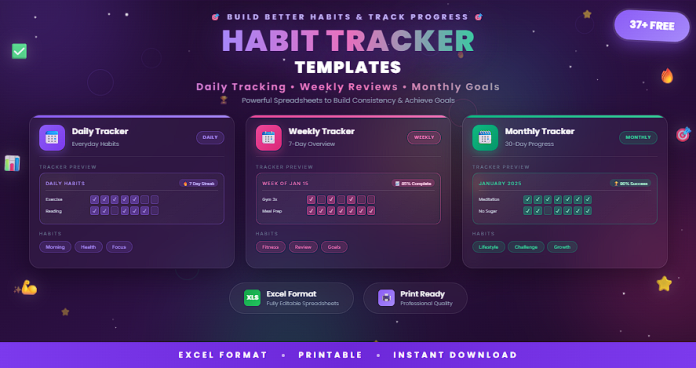
This guide includes 37+ free Excel habit tracker templates for daily, weekly, and monthly planning—ideal for personal growth, wellness goals, academic routines, and professional productivity.
What Is a Habit Tracker Template?
A habit tracker template is a structured tracking sheet used to monitor recurring behaviors over a set period.
A standard habit tracker template may include:
- Habit list or routine categories
- Daily/weekly/monthly completion cells
- Checkbox or numeric tracking fields
- Streak counters and completion percentages
- Progress charts and visual summaries
- Notes and reflection sections
Habit trackers help you convert intentions into repeatable, trackable actions.
Why Use Free Habit Tracker Templates in Excel?
Using Excel habit tracker templates provides both flexibility and measurable insights.
Key benefits include:
- Clear structure for routine consistency
- Visual progress tracking with charts and metrics
- Easy customization by goal type and schedule
- Automatic calculations for streaks and completion rates
- Better accountability and self-review
- Reusable templates for long-term behavior change
Excel is especially useful when you want more than checkmarks—you want trends and data.
37+ Free Habit Tracker Templates [Daily, Weekly, Monthly] in Excel
Below is a curated template collection organized by tracking frequency and purpose.
Daily Habit Tracker Templates (1–14)
- Simple Daily Habit Tracker
- Daily Checklist Habit Tracker
- Morning Routine Habit Tracker
- Evening Routine Habit Tracker
- Health Habits Daily Tracker
- Water Intake and Wellness Tracker
- Daily Fitness Habit Tracker
- Daily Study Habit Tracker
- Daily Productivity Habit Tracker
- Digital Detox Daily Tracker
- Self-Care Daily Habit Tracker
- Mood + Habit Daily Tracker
- Daily No-Spend Habit Tracker
- Daily Streak-Focused Tracker
Weekly Habit Tracker Templates (15–25)
- Weekly Habit Tracker (Basic)
- Weekly Routine Planner + Tracker
- Weekly Workout Habit Tracker
- Weekly Learning Tracker
- Weekly Family Routine Tracker
- Weekly Focus and Deep Work Tracker
- Weekly Reading Habit Tracker
- Weekly Time Blocking Habit Tracker
- Weekly Reflection Habit Tracker
- Weekly Minimal Habit Scorecard
- Weekly Team Accountability Habit Tracker
Monthly Habit Tracker Templates (26–37+)
- Monthly Habit Calendar Tracker
- Monthly Streak and Consistency Tracker
- Monthly Goal-Based Habit Tracker
- Monthly Health Habit Dashboard
- Monthly Financial Habit Tracker
- Monthly Sleep and Energy Habit Tracker
- Monthly Mindfulness Habit Tracker
- Monthly Productivity KPI Habit Tracker
- Monthly Personal Growth Tracker
- Monthly 30-Day Challenge Tracker
- Monthly Multi-Habit Dashboard (Excel)
- Printable Monthly Habit Tracker (Excel)
- Complete Daily/Weekly/Monthly Habit Tracker Pack
Why Use Excel for Habit Tracking?
Excel is one of the best tools for habit tracking because it combines structure, automation, and analysis.
Excel advantages include:
- Automatic totals, percentages, and streak formulas
- Conditional formatting for instant visual feedback
- Custom dashboards and trend charts
- Flexible layout for any habit category
- Easy duplication for new months and routines
It is ideal for anyone who wants measurable progress, not just a static checklist.
Best Practices for Using Habit Tracker Templates
To get stronger results from your habit tracker:
- Start with 3–5 high-impact habits first
- Define habits clearly (specific and measurable)
- Track at the same time each day or week
- Focus on consistency before intensity
- Review progress weekly and adjust realistically
- Use monthly reflection to remove low-value habits
The goal is progress you can sustain—not perfection.
Common Mistakes to Avoid
When using habit trackers, avoid:
- Tracking too many habits at once
- Choosing vague habits without measurable criteria
- Skipping reviews and only checking boxes
- Resetting goals too aggressively after missed days
- Ignoring trend data and repeating ineffective routines
- Building a complex sheet you do not actually use
A simple system used consistently beats a complex system ignored.
Frequently Asked Questions
Can I track daily, weekly, and monthly habits in one Excel file?
Yes. Many templates include separate tabs for each time frame with linked summaries.
Are these templates suitable for beginners?
Yes. Basic trackers are simple to use, while advanced versions include dashboards and formulas.
Can I print Excel habit tracker templates?
Yes. You can format them for A4/Letter printing or use them digitally.
What is the best number of habits to start with?
Most people do best starting with 3–5 core habits.
Do I need formulas to use these templates?
Not necessarily. Basic templates work manually, while advanced templates use formulas for automation.
Conclusion
Habits shape results, and tracking shapes habits. The 37+ free habit tracker templates in Excel in this guide give you practical systems for daily, weekly, and monthly consistency—whether your focus is health, learning, productivity, or personal growth.
With the right tracker, you can monitor progress clearly, build better routines, and turn small actions into long-term outcomes.

